
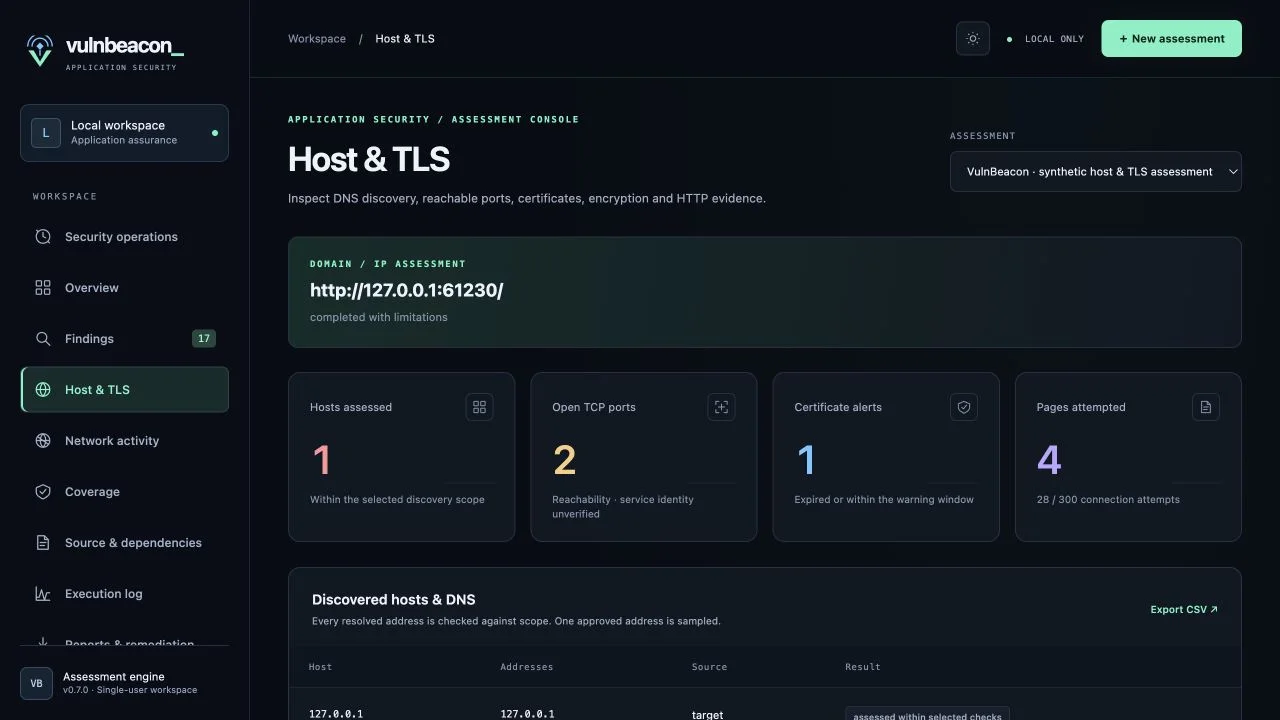
What can a domain or IP scan check?
A useful scan connects each observation to the asset and check that produced it. VulnBeacon records successful probes, failures, and unavailable checks so an incomplete assessment remains visible.
- TLS certificates
- Review trust and hostname validation, expiry, subject alternative names, issuer details, key strength, and the presented certificate chain where supported. Findings include procedures to correct the observed configuration and verify the result.
- Encryption and protocols
- Probe declared TLS versions and cipher offers. Record what was negotiated, what failed, and what the scanner could not test locally. The assessment uses a bounded set of offers rather than claiming an exhaustive encryption audit.
- HTTP security headers and cookies
- Inspect HSTS, Content Security Policy, framing protection, MIME-sniffing protection, cookie attributes, and mixed-content references in sampled markup. Missing protections are configuration evidence; their absence alone does not establish an exploitable vulnerability.
- Selected ports and services
- Check approved TCP ports and record open, refused, or inconclusive results. Optional service greetings and SSH algorithm observations add context. Discovery stays within the selected scope and limits.
Look beyond the usual header checklist
Bounded GET/DNS exposure checks add configuration evidence for CORS policy, reflected Host headers, shared caching, exposed files and debug endpoints, public JavaScript source maps, and dangling CNAME records.
Exposed-file checks require a matching content signature, rather than treating any HTTP 200 response as exposure. Findings retain limited evidence such as size and a hash instead of storing the retrieved file's contents. A dangling DNS indicator does not prove a takeover is possible, and no takeover is attempted.
Review the actual checks and prerequisites in the assessment plan. Reports show tools that ran, unavailable prerequisites and capabilities not assessed.
From target to a reviewable finding
- Define the approved scope. Enter the domain, IPv4/IPv6 address, or HTTP(S) URL, choose ports and checks, and supply the authorization reference, operating contact, and testing window.
- Collect bounded observations. Run the selected checks. Optional page discovery stays inside approved hosts, paths, and request limits. Newly discovered subdomains enter a review queue; discovering a host does not authorize a target scan.
- Review the evidence. Use Host and TLS details to connect a finding with its certificate, protocol, header, or service observation. Read coverage limitations alongside results.
- Remediate and retest. Make approved changes through your normal release process, request a retest, and run a comparable assessment. Supported checks can resolve a finding only when equivalent passing evidence is recorded; other cases need an evidence-backed manual retest.
Interpret results in context
Saved application authorization defines the targets, activities and testing window. Each live run rechecks those boundaries, and a daily per-target connection budget applies across runs and schedules. Exclusions and per-run limits still apply.
A timeout is inconclusive. A rejected TLS offer is an observed failure, not proof that every server node rejects that algorithm. A scan samples an approved resolved address, so CDN and load-balancer behavior may differ between nodes.
Domain/IP scanning does not perform exploitation, authenticated browser journeys, exhaustive subdomain enumeration, or arbitrary remote operating-system patch verification. Use separate authenticated API permission checks and source and supply-chain review for those assessment goals.
For private networks, use a collector with the required connectivity. Read how local network scanning and scanner imports complement a public-facing domain assessment.
Domain-scanning questions
Can I enter only a domain name?
Yes. A bare hostname defaults to HTTPS. You can also provide an IP address or HTTP(S) URL. A URL path narrows page discovery to the approved path prefix; custom ports must be approved.
Does the scan automatically fix my configuration?
No. VulnBeacon provides remediation procedures and proposed retest criteria. Your team reviews and applies changes, then records the outcome.
Can I export the results?
Yes. Security reports and remediation exports bring the findings, scope, evidence, and coverage limits together for review and sharing.